- Windows
- Guides
Best Dictation Software for Windows 10 & 11 (2026)
Compare the best dictation and voice typing software for Windows 10 and 11 in 2026: free vs paid, AI clean-up, privacy, languages and who each app suits.
15 min read
Disclosure: Wurd is made by 6amTech, the publisher of this blog. We've included it as one option among many and described its limits honestly. Wurd is in beta and needs an internet connection; there's no offline mode. Every fact about another product comes from that company's official website or help pages, linked and checked on 28 Oct 2026. Prices and features change, so check before you buy.
Windows already has free voice typing built in, so do you need anything else? It depends on how much you dictate, which apps you write in, which languages you speak, and whether your audio can go to the cloud. This guide covers the best dictation software for Windows, from the free built-in tools to AI dictation apps, and works as a shortlist of the best speech to text software for Windows and voice typing software for PC.
Quick picks: best dictation software for Windows by use case
| App | Price model | Works in any app? | Languages | Offline? | Best for |
|---|---|---|---|---|---|
| Windows Voice Typing | Built into Windows | Yes (any text box) | Microsoft's published list | No (online speech recognition) | Free, quick dictation |
| Windows Voice access | Built into Windows 11 (22H2+) | Yes, plus PC control | English, Spanish, German, French, Chinese, Japanese, Italian | Yes, after language download | Hands-free PC control |
| Wurd | Free plan; Pro planned | Yes | Any language, mixed mid-sentence (no list published) | No | Multilingual and mixed-language speakers |
| Wispr Flow | Free tier; paid from $12/user/mo (annual) | Yes | 100+ | No (cloud) | Polished AI clean-up |
| Superwhisper | Free (local); Pro $8.49/mo or $84.99/yr | Yes | 100+ (model-dependent) | Yes (local models) | Offline and model choice |
| Aqua Voice | 1,000 free words; Pro from $10/mo (annual) | Yes (desktop apps; some fields restrict it) | 49 | Varies | Trying a capped free plan first |
| Willow Voice | Free tier; Pro from $12/user/mo (annual) | Yes | 100+ | Offline mode (platforms not stated) | Unlimited free basic dictation |
| Handy | Free, open source | Yes (any text field) | Depends on model (Whisper: 99+) | Yes (on your computer) | Free, private, local |
| Dragon Professional v16 | Contact us | Not stated | Not stated | Not stated | Established professional users |
| Google Docs Voice Typing | Included in Google Docs | No (Docs and Slides) | Long list | Not stated (browser handles speech) | Writing in Google Docs |
| Microsoft 365 Dictate | With Microsoft 365 or supported Office | No (Office apps) | Not stated | No (needs internet) | Writing in Word and Outlook |
Sources (all checked 28 Oct 2026) are linked in each section below.
How we chose (and what matters on Windows)
We don't rank on accuracy. It depends on your voice, mic, accent, languages and vocabulary, so the fair test is your own, and most of these tools are free to try. Instead, we compared five things.
Works in any app vs only inside one program
Some tools type into any text box on your PC (Windows Voice Typing, Wurd, Wispr Flow, Superwhisper, Aqua Voice, Willow and Handy). Others only work inside one program, like Google Docs or Microsoft Word. If you write in email, chat, a browser and a code editor, you want the first kind.
AI clean-up vs raw transcription
Raw transcription writes exactly what it hears. AI dictation apps also remove filler words, add punctuation and format paragraphs or lists. Clean-up saves editing time, but you should check that the app doesn't add things you didn't say.
Languages and mixed-language speech
Most tools list supported languages, and some, such as Wispr Flow and Aqua Voice, detect one language per dictation. If you mix languages in a sentence, such as Spanish with English, Hindi with English, or Arabic with French, test that specifically.
Privacy: where your audio goes; offline vs cloud
Cloud tools send audio to a server to be transcribed. Local tools (Superwhisper's local models, Handy, Voice access) keep audio on your PC.
Price and free limits
Free plans range from "built in" to weekly word limits to unlimited dictation with a smaller model. We list the limits stated on each official page.
The best dictation apps for Windows
Windows Voice Typing (built in, Win + H)
Every Windows 10 and 11 PC has voice typing. Press Windows key + H in any text field. Microsoft says it "uses online speech recognition, which is powered by Azure Speech services", so you need an internet connection. You can turn on a voice typing launcher and automatic punctuation. On Copilot+ PCs, Fluid dictation uses on-device models to correct grammar, punctuation and filler words, in English locales. The same page lists the languages supported in Windows 11 (Microsoft Support, checked 28 Oct 2026).
Standout: free, already there, works everywhere. Limits: online only, and basic clean-up unless you have a Copilot+ PC. Price: built into Windows. Best for: quick messages and occasional use.
Also built in: Voice access. On Windows 11 version 22H2 and later, Voice access lets you control your PC and write text by voice. It works "without an internet connection" once you've downloaded the language files. It's available in English, Spanish, German, French, Chinese, Japanese and Italian (Get started with voice access and Set up voice access, both checked 28 Oct 2026).
Wurd
Wurd voice keyboard is an AI dictation app that runs on Windows 10 and 11 from the system tray. Hold Ctrl + Win anywhere to dictate, then let go and clean text appears where your cursor is. See how Wurd's hold-to-talk dictation works. It types anywhere you can paste: email, chat, documents, browsers, code editors and terminals. If an app can't accept the text (for example, a Windows app running as administrator), Wurd copies it and tells you.
Standout: any language, even mixed. Wurd is built to dictate in any language. It recognises the language you speak by itself, and you can switch languages mid-sentence, for example Spanish with English, Hindi with English or Arabic with French. It also handles languages like Chinese and Bangla. Wurd doesn't publish a language list, so test yours on the free plan.
Guardrails: "It never adds words." It removes the ums, keeps your corrections and fixes punctuation, but doesn't add greetings or ideas you didn't say. "It checks every number." Prices, phone numbers, dates and order IDs are compared with what you said, and if one doesn't match you get your own words back with a warning. You also get a dictionary (100 words on Free) and snippets (10 on Free).
Limits:
- On a Mac, hold fn + Control to translate. Wurd's site documents Windows dictation as hold Ctrl + Win, and it doesn't publish a Windows shortcut for Translate.
- Wurd is in beta and needs an internet connection; there's no offline mode.
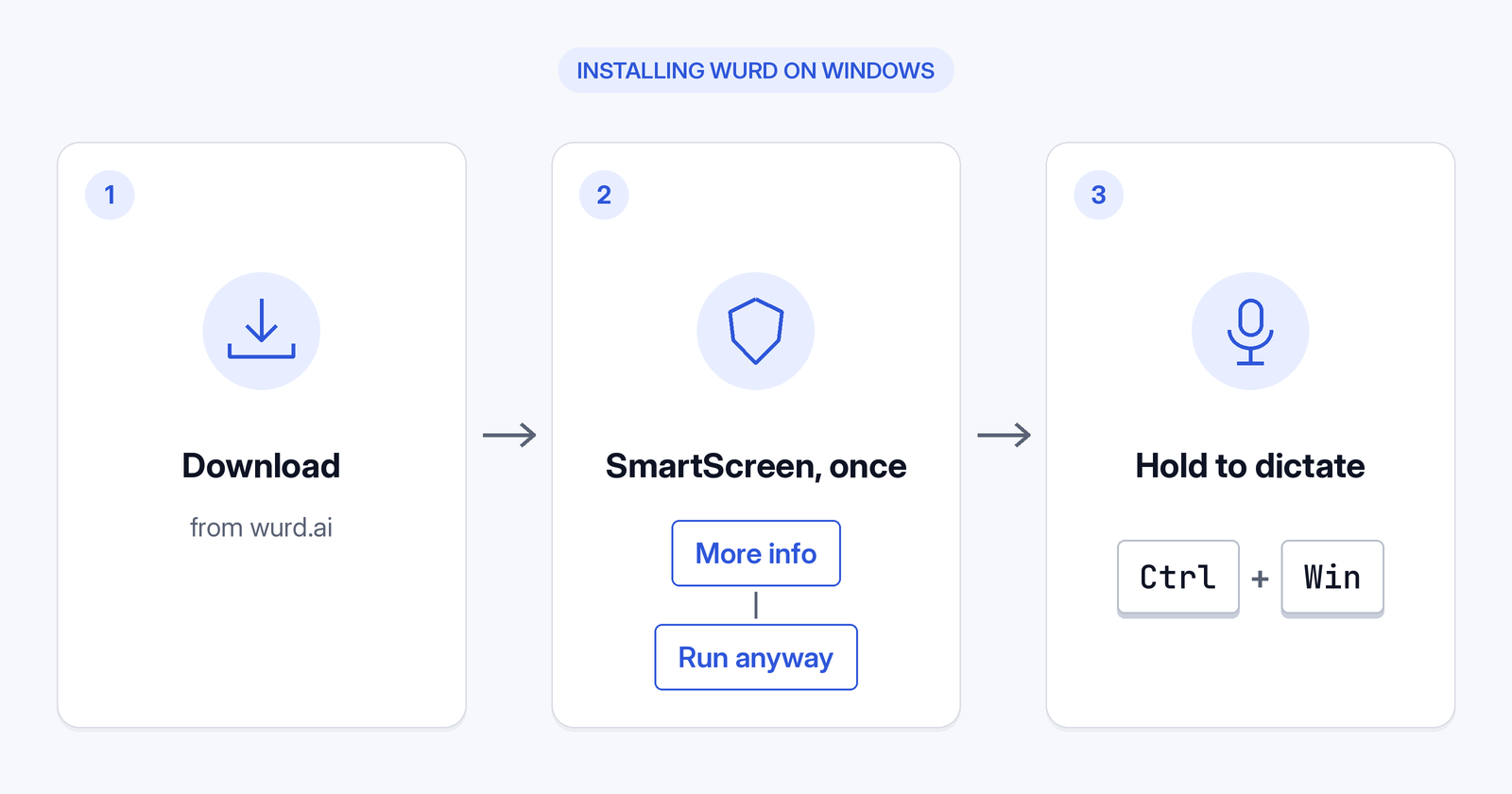
- The Windows app isn't code-signed, so Windows shows a SmartScreen warning ("Windows protected your PC") when you install it. Wurd's site says to click More info, then Run anyway. On some new Windows 11 installs, Smart App Control may block it; see the FAQ below.
- Mac and Windows available; iPhone and Android in private beta.
Price: Free plan, $0 with 2,000 words a week. Pro is planned at $12 a month or $96 a year. Paid plans aren't open, and prices may change. Every new account starts with 14 days of Pro, up to 30,000 words. No card needed. See Wurd's free plan.
Privacy: Wurd never stores your audio. Its speech-to-text provider is ElevenLabs. "We delete each transcript at our speech provider right after the dictation; the AI step runs only on zero-data-retention endpoints." Read how Wurd handles your voice data.
Best for: people who speak more than one language or mix languages, and anyone who wants clean text without added words.
Wispr Flow
Wispr Flow is a cloud AI dictation app for Windows, Mac and iPhone. Its pricing and system-requirements pages also list Android, while its downloads page shows an Android waitlist. On Windows it needs Windows 10 or 11 on an x64 processor, and "Windows on ARM and Snapdragon are unsupported". The default Windows shortcut is Ctrl + Win, the same as Wurd's, though new setups may start on Caps Lock. It removes filler words, handles corrections, and has a dictionary, snippets and Styles (English, desktop only). "Transcription always occurs on the cloud" (all checked 28 Oct 2026: pricing, downloads, system requirements, hotkeys, Data Controls).
Standout: automatic formatting and clean-up in any app. Limits: x64 PCs only, and transcription is always in the cloud. Price: free for 2,000 words a week on desktop; Pro is $15/user/month monthly or $12 annually. Best for: people who want polished, automatic formatting and use x64 PCs.
Dragon Professional (Nuance)
Dragon Professional v16 is still offered on Nuance's official site. The page says it's "optimized for Windows 11 and backwards-compatible to Windows 10", and pricing is by "Contact us" rather than a listed price (Dragon Professional, checked 28 Oct 2026). Its data sheet dated 2022, still linked on 28 Oct 2026 from that page, lists Windows 10 or 11, a minimum of 4 GB RAM and 8 GB of free disk space.
Standout: a long-established Windows dictation product. Limits: price, offline use and languages aren't stated on the pages we checked. Price: Contact us (price not stated). Best for: organisations and professionals already using Dragon workflows.
Superwhisper
Superwhisper runs on Windows 10 and 11 on both x64 and ARM64, and "a GPU is not required". It turns your voice into text "in any app", and it "works offline": local voice models transcribe without internet. The free plan gives unlimited dictation with local Whisper models. Models cover 100+ languages (all checked 28 Oct 2026: Windows setup, introduction, plans, voice models).
Standout: offline dictation with local models. Limits: AI modes and cloud models need Pro. Price: $8.49/month, $84.99/year or $249.99 lifetime. Best for: offline dictation and people who like to choose their own models. On Windows on ARM, its only local option is Parakeet Multilanguage, which needs Pro.
Aqua Voice
Aqua Voice is available for Windows, Mac, iOS and Android. It inserts text at the cursor across desktop apps, though some apps or fields restrict insertion. It lists 49 languages, with auto-detect per dictation. "Cloud dictation needs an internet connection", and offline availability varies (all checked 28 Oct 2026: pricing, FAQ, languages).
Standout: a free plan to try it with no card. Limits: the free plan includes 1,000 words; Aqua's FAQ calls it a free trial. Price: Pro is $10/month billed annually or $12 monthly. Best for: trying a capped free plan before a $10/month annual Pro.
Willow Voice
Willow is "available on Mac, Windows, and iPhone", and you can dictate into any text field. It says it covers 100+ languages and has an offline mode (the platforms aren't stated), and that it "does not store your voice recordings" (all checked 28 Oct 2026: Willow, pricing, security).
Standout: unlimited free dictation with its Frontier Mini model, plus 20 Scribe uses a week. Limits: offline platforms aren't stated. Price: Pro is $15 monthly or $12/user/month annually. Best for: unlimited free basic dictation.
Handy
Handy is "the free and open source app for speech to text". "Your voice stays on your computer," with no audio sent to the cloud. Downloads are offered for Windows (x64 and ARM), Linux and macOS. Its docs recommend Parakeet V3 for English and European languages, and Whisper "for multilingual support with 99+ languages" (all checked 28 Oct 2026: Handy, download, docs).
Standout: free, open source and local. Limits: it's built as "One tool, one job": transcribe what you say and put it into a text box. AI clean-up is a separate post-processing setting in its docs. Price: free. Best for: free, private, local dictation.
Google Docs Voice Typing
In Google Docs, choose Tools > Voice typing. It works in the latest Chrome, Edge and Safari, and only inside Docs (and Slides speaker notes). It supports a long list of languages, but voice commands work only in English (Google Docs Help, checked 28 Oct 2026).
Standout: no extra app to install. Limits: only works inside Docs and Slides. Price: included in Google Docs. Best for: drafting directly in Google Docs.
Microsoft 365 Dictate
Dictate works in the desktop versions of Word, Excel, Outlook and PowerPoint with Microsoft 365 or "supported perpetual versions", and Microsoft says "Features in the web or mobile apps may differ". It needs "a microphone and reliable internet connection" (Dictate in Microsoft 365, checked 28 Oct 2026).
Standout: built into the Office apps you may already use. Limits: only works inside Office apps and needs internet. Price: with Microsoft 365 or a supported Office version. Best for: people who write mostly in Word and Outlook.
Comparison table: price, platforms, offline, languages, privacy
| App | Free option | Paid (from) | Windows support | Other platforms | Offline | Privacy note |
|---|---|---|---|---|---|---|
| Windows Voice Typing | Built in | — | Windows 10/11 | — | No | Azure Speech (online) |
| Voice access | Built in | — | Windows 11 22H2+ | — | Yes, after download | On-device recognition |
| Wurd | 2,000 words/week | Pro planned $12/mo; not open | Windows 10/11 (not code-signed, so SmartScreen warns on install; click More info, then Run anyway) | Mac; iPhone and Android in private beta | No | ElevenLabs (speech-to-text); Wurd never stores your audio |
| Wispr Flow | 2,000 words/week (desktop) | $12/user/mo annual | Windows 10/11 x64 | Mac, iPhone; Android listed (see entry) | No | Cloud; training opt-out; SOC 2 Type II |
| Superwhisper | Unlimited (local models) | $8.49/mo or $84.99/yr | Windows 10/11 x64 and ARM64 | Mac, iOS, Android | Yes (local) | Local option |
| Aqua Voice | 1,000 words (free trial) | $10/mo annual | Yes | Mac, iOS, Android | Varies | Privacy Mode; SOC 2 Type II |
| Willow Voice | Unlimited (Frontier Mini model) | $12/user/mo annual | Yes | Mac, iPhone | Offline mode (platforms not stated) | No voice recordings stored |
| Handy | Free | — | Windows x64 and ARM | macOS, Linux | Yes | Voice stays on your computer |
| Dragon Professional v16 | Not stated | Contact us | Windows 10/11 | Not stated | Not stated | Not stated |
| Google Docs Voice Typing | Included in Docs | — | In browser (Chrome, Edge) | Browser on other systems | Not stated | Browser handles speech |
| Microsoft 365 Dictate | Not stated | With Microsoft 365 | Office desktop apps | Mac; web and mobile (features may differ) | No | Not stated |
All competitor cells come from the official pages linked above, checked 28 Oct 2026. "Not stated" means we couldn't confirm it there.
Free vs paid dictation software for Windows: which do you need?
Free is enough if you dictate short messages in one language. Windows Voice Typing, Voice access, Google Docs Voice Typing, Handy and Superwhisper's free local plan cost nothing. Wurd's free plan and Wispr Flow's free tier add AI clean-up within weekly limits.
Paying makes sense if you dictate for hours a day, need unlimited words or cloud AI models, or need team features. Wurd's paid plans aren't open.
Tips to get better dictation results on Windows
- Use a decent microphone. A headset mic usually beats a laptop mic in a noisy room.
- Speak in full thoughts. AI apps often punctuate better when you finish a sentence before pausing.
- Let the app handle punctuation, or say it. Built-in voice typing has auto-punctuation. AI apps add it for you.
- Add names and jargon to the dictionary. Most AI apps (Wurd, Wispr Flow, Superwhisper, Aqua) have one.
- Check numbers before sending, especially prices and IDs, whatever app you use.
FAQ
Does Windows 11 have built-in dictation software? Yes. Press Windows key + H to start voice typing. It uses online speech recognition. Windows 11 also has Voice access for controlling your PC by voice (Microsoft Support, checked 28 Oct 2026).
What is the best free dictation software for Windows? There's no single best voice to text app for PC. For quick use, Windows Voice Typing. For free local and private dictation, Handy or Superwhisper's free plan. For free AI clean-up in any language, try Wurd's free plan.
Which dictation software works in Microsoft Word or any app? Microsoft 365 Dictate works inside Word and other Office apps. Windows Voice Typing, Wurd, Wispr Flow, Superwhisper, Aqua Voice, Willow and Handy type into other apps too.
Is there dictation software for Windows that works offline? Yes: Voice access (after downloading language files), Superwhisper's local models and Handy. Wurd doesn't work offline. It needs an internet connection.
Which dictation app supports multiple languages or mixed languages in one sentence? Wispr Flow and Aqua Voice, for example, detect one language per dictation, and Wispr Flow offers a separate Hinglish option (Wispr Flow languages, checked 28 Oct 2026). Wurd is built to dictate in any language and to handle switching mid-sentence.
Is Dragon still available for Windows? Yes. Nuance's site offers Dragon Professional v16 for Windows 11 and 10, with "Contact us" for pricing (Dragon Professional, checked 28 Oct 2026).
Is it safe to install a dictation app that isn't code-signed? It can be, if you download it from the developer's official site and keep Windows' protections on. Code signing tells Windows who published an app. Microsoft says unsigned apps get a "Windows protected your PC" SmartScreen warning, where the user must choose "Run anyway", and that users "should proceed only after verifying the source" (Microsoft Learn: SmartScreen reputation, checked 28 Oct 2026). The Wurd Windows app isn't code-signed, so Windows shows a SmartScreen warning when you install it. Only download it from wurd.ai. When the prompt appears, Wurd's site says to click More info, then Run anyway. On some Windows 11 PCs, Smart App Control "will block execution of unsigned files unless the file has a positive reputation" (same page). Smart App Control can be used on new Windows 11 installs only and isn't available in Windows 10 (Windows Security: App & browser control, checked 28 Oct 2026). Keep SmartScreen and Smart App Control turned on. If your PC blocks the installer, choose another app on this list. See the Wurd FAQ.
Verdict
- Free and simple: Windows Voice Typing.
- Offline and private: Superwhisper (local) or Handy.
- Polished cloud AI on x64 PCs: Wispr Flow.
- Hands-free PC control: Voice access.
- Working inside Office or Docs: Microsoft 365 Dictate or Google Docs Voice Typing.
- Multilingual or mixed-language speech: Wurd. The Windows app isn't code-signed: if Windows says "Windows protected your PC", click More info, then Run anyway.
Keep reading
- Bangla
- Guides
- Mac
- Windows
Bangla Voice Typing on Mac & Windows: How-To (2026)
How to do Bangla voice typing on a Mac or Windows PC when built-in dictation has no Bangla: step-by-step setup, Banglish tips and fixes.
12 min read
- Guides
- Mac
- Windows
How to Dictate in Spanish, Hindi or Arabic on Mac & PC
Dictate in Spanish, Hindi or Arabic on Mac or Windows: built-in dictation settings step by step, which languages each supports, and a dictation app option.
10 min read